AI: Product Conversation Hub
The Short Version
Product Conversation Hub is an AI-assisted product discovery system for an industrial e-commerce catalog. It scrapes product pages, cleans and enriches the product metadata with LLM workflows, indexes the result in Pinecone, and exposes a Streamlit chat interface where users can ask about products by ID, price, material, dimensions, condition, and other specs.
The project sits between automation, scraping, and retrieval-augmented generation: the goal was not only to answer questions, but to build a pipeline that turns messy product pages into searchable product knowledge.
Problem
Large online catalogs can be hard to navigate when a buyer has specific constraints. A normal product page contains the information, but it may be spread across descriptions, specification tables, variants, prices, reviews, and related-product sections.
The practical goal was to support shopping-style questions such as:
- “I want to look at product 98-1990GB.”
- “Find used products below a certain price.”
- “Show me stackable plastic containers with these dimensions.”
- “What is the material, color, weight, and volume of this item?”
- “Which retrieved products are relevant to this request?”
This required more than a chatbot on top of raw text. The system needed scraping, file storage, metadata cleanup, enrichment, vector search, structured filtering, and a user-facing product assistant.
Approach
Product scraping - A Python scraper uses requests and BeautifulSoup to crawl Kruizinga product pages, identify product-like URLs, extract page text, normalize repeated lines, and save each product as JSON. The local run produced hundreds of product JSON/XML files covering industrial catalog items such as storage bins, steel containers, waste bins, transport cases, and accessories.
Google Drive and Sheets workflow - Google Sheets was used as a lightweight control plane for prompts and URL lists. Google Drive acted as the handoff layer between raw scraped files, cleaned metadata files, enriched metadata files, and files ready for indexing.
n8n automation - The n8n workflow connected the pipeline visually. It read the cleaning and enrichment prompts from Sheets, downloaded scraped product files from Drive, sent the content through LLM nodes, converted the outputs back to JSON, saved cleaned and enriched metadata to Drive, and then merged the results for Pinecone ingestion.
Metadata cleaning and enrichment - The cleaning branch extracted structured fields such as product ID, article code, condition, price, dimensions, material, color, weight, volume, product type, and source URL. The enrichment branch generated richer product metadata and question-answer context so the chatbot could explain products in a more useful way than a raw scrape.
Vector search and filters - Product records were embedded with OpenAI embeddings and stored in Pinecone. The Streamlit app supports normal semantic retrieval, and also includes a structured-query path where an LLM turns user language into a Pinecone metadata filter for fields such as price, condition, color, and product ID.
Chat interface - The front end is a Streamlit app called Product Conversation Hub. Users can ask questions in a chat window, upload supporting documents, see retrieved product sources in a side panel, and receive a generated answer grounded in the retrieved product metadata.
Deployment path - The app includes a Dockerfile and Google App Engine Flexible configuration, making it deployable as a Streamlit service on port 8080.
Result
The project produced a production-ready end-to-end product assistant pipeline:
- raw product scraping from Kruizinga.nl,
- hundreds of product JSON/XML records,
- n8n workflows for cleaning and enriching metadata,
- Drive folders for raw, cleaned, and enriched product files,
- Pinecone indexing with OpenAI embeddings,
- structured metadata retrieval for product-specific questions,
- a Streamlit chat UI for product exploration,
- source links shown beside the answer so users can inspect retrieved products.
In one test query, the assistant handled a product-ID request and returned a structured product overview with dimensions, material, color, weight, volume, and price, while showing related retrieved products in the source panel.
As a portfolio project, this is a strong example of applied AI engineering: the useful behavior came from the whole system, not from a single model call.
Screenshots
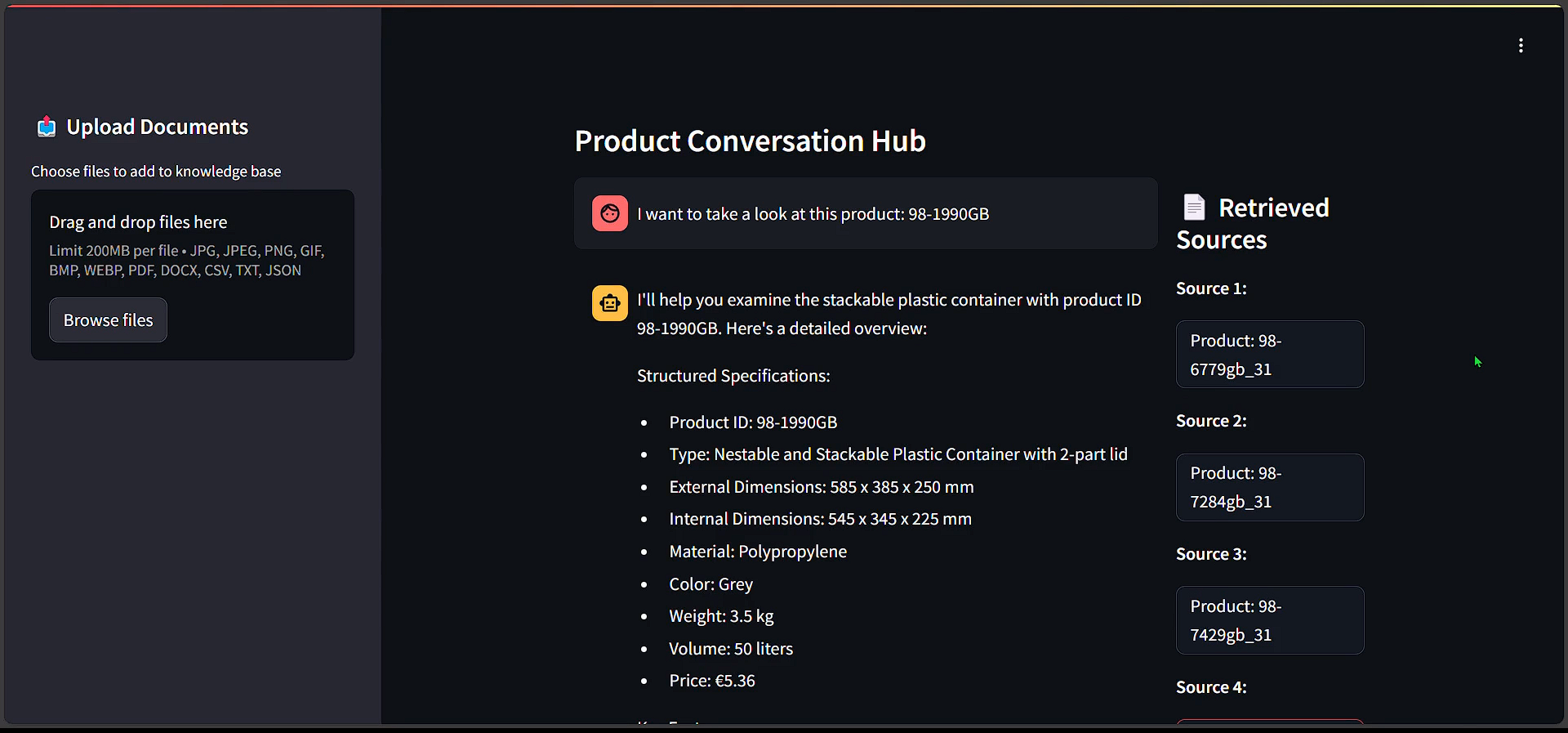
The Streamlit interface lets a user ask product-specific questions and inspect retrieved product sources beside the generated answer.
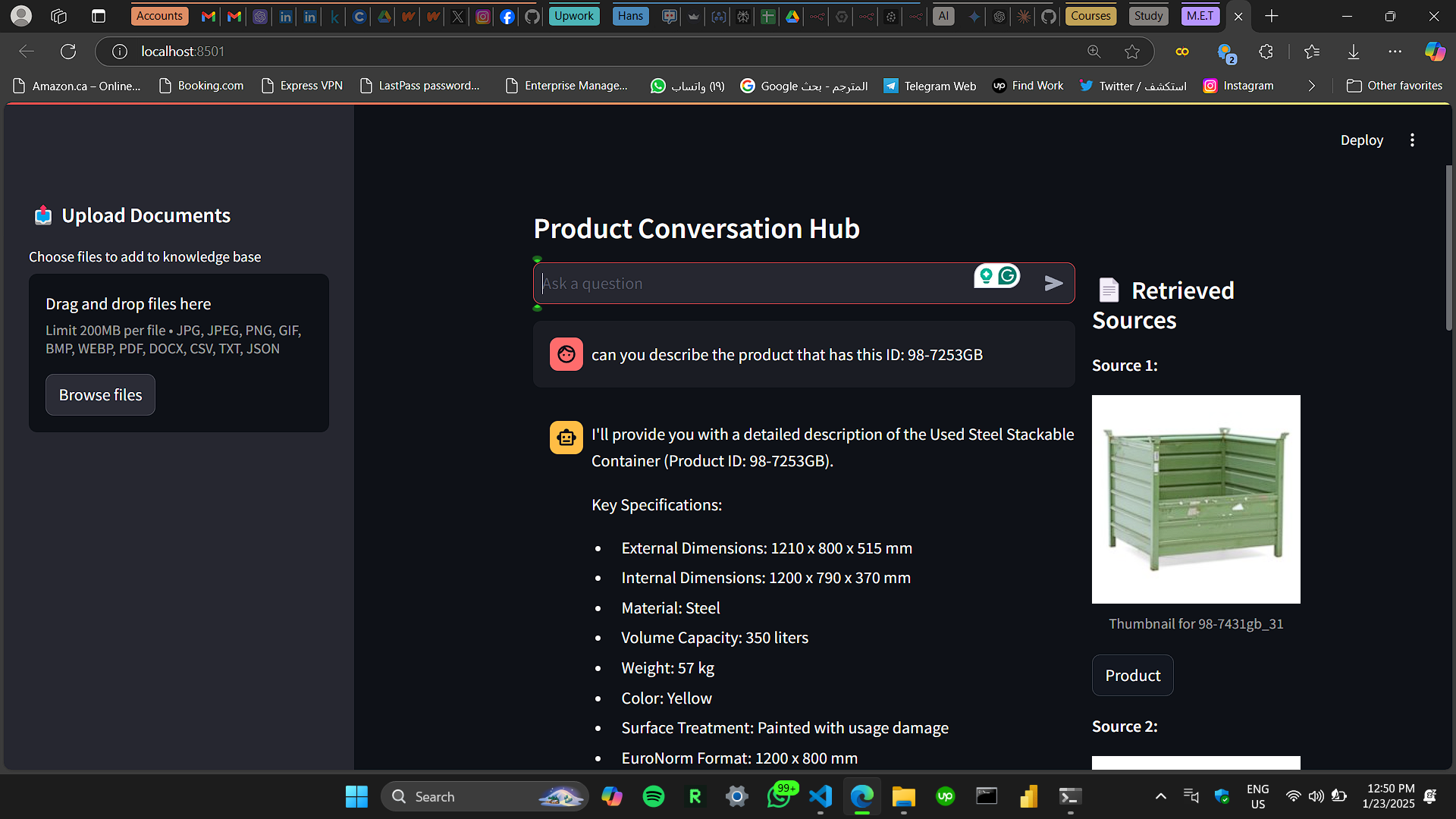
The assistant can answer product-ID questions while surfacing retrieved catalog sources, including product thumbnails and direct product links.
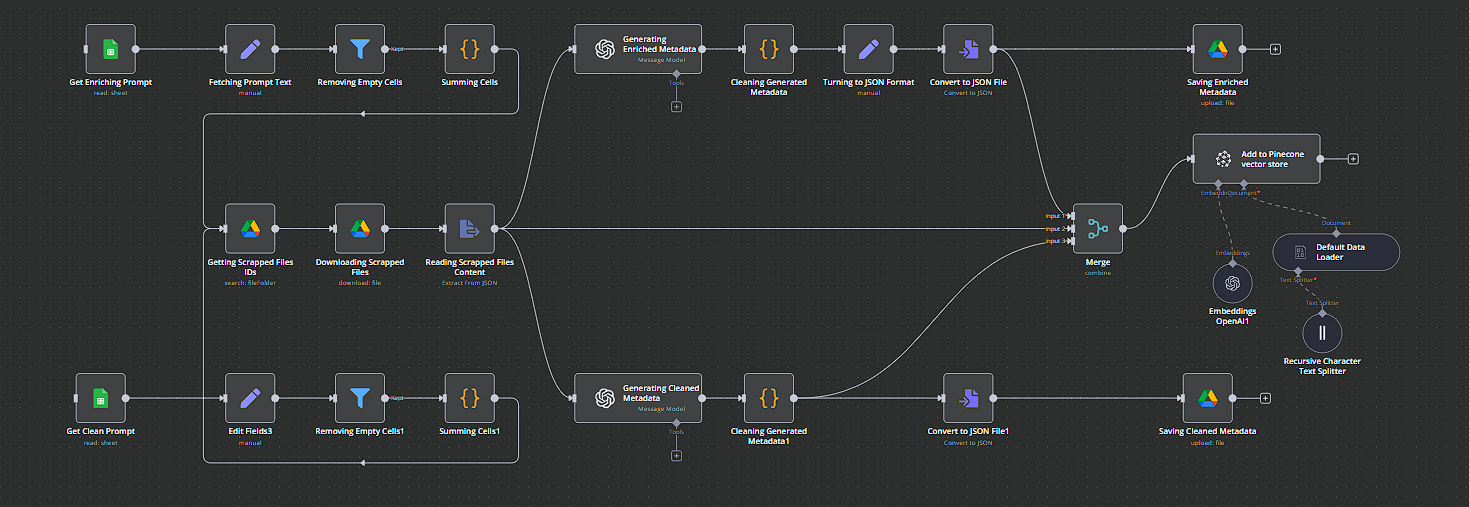
The n8n workflow connects Google Sheets prompts, Google Drive product files, LLM metadata cleaning/enrichment, JSON conversion, Drive storage, and Pinecone vector indexing.
What I Learned
This project made the architecture around RAG feel much more real. The difficult parts were not only embeddings and prompts; they were data preparation, metadata consistency, source traceability, workflow orchestration, and deciding when semantic search should be combined with exact structured filters.
It also reinforced an important production lesson: credentials, API keys, OAuth tokens, and client secret files should never live directly in source code or project folders. The production-ready version depends on keeping secrets outside the repository, validating generated JSON, handling workflow errors carefully, and monitoring retrieval quality.
Links
- GitHub
- Related LinkedIn post: n8n automation and AI engineering